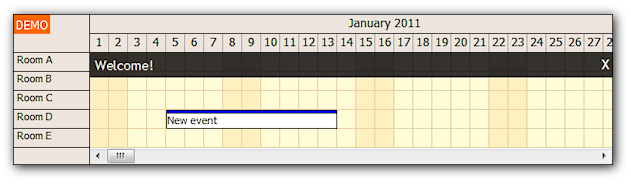
Note: See an updated version of this tutorial for ASP.NET MVC 4: Scheduler for ASP.NET MVC 4 Razor (November 12, 2012)
This tutorial shows how to use the DayPilot Pro MVC Scheduler with MVC 3 and Razor engine.
Download
- TutorialMvc3SchedulerRazor.zip (3 MB) - Includes C# and VB.NET Source
Prerequisites
- DayPilot Pro for MVC 1.2.5361 or later (1.2.5361 trial DLL is included)
- Visual Studio 2010 (optional)
- SQL Server 2005+ (Express)
- ASP.NET MVC 3
- .NET Framework 4.0
Installation
DLL
- Put DayPilot.Mvc.dll in the bin directory of the web application.
- Add it to project references if you are using a compiled web project.
Scripts
Include the following scripts in the web page (the scripts can be found in Scripts/DayPilot directory):
- common.js
- scheduler.js
All the scripts are included in the site template (Views/Shared/_Layout.cshtml or Views/Shared/_Layout.vbhtml):
<head>
    <!-- ... -->
    <script src="@Url.Content("~/Scripts/DayPilot/common.js")" type="text/javascript"></script>
    <script src="@Url.Content("~/Scripts/DayPilot/scheduler.js")" type="text/javascript"></script>
</head>
CSS Themes
Include the Content/DayPilot directory from the DayPilot demo project.
Include Content/DayPilot/themes.css stylesheet in the web page:
<head>
    <!-- ... -->
    <link href="@Url.Content("~/Content/DayPilot/themes.css")" rel="stylesheet" type="text/css" />
</head>
View
Add the Scheduler control to the view (Views/Home/Index.cshtml or Index.vbhtml):
C#
@using DayPilot.Web.Mvc;
@using DayPilot.Web.Mvc.Events.Scheduler;
@using DayPilot.Web.Mvc.Enums.Scheduler;

@Html.DayPilotScheduler("dps", new DayPilotSchedulerConfig{})
VB.NET
@imports DayPilot.Web.Mvc
@imports DayPilot.Web.Mvc.Events.Scheduler
@imports DayPilot.Web.Mvc.Enums.Scheduler

@Html.DayPilotScheduler("dps", new DayPilotSchedulerConfig)
This will add an empty Scheduler with default settings.
In order to show calendar data, we need to specify the backend url:
C#
@Html.DayPilotScheduler("dps", new DayPilotSchedulerConfig
{
    BackendUrl = Url.Content("~/Scheduler/Backend")
})
VB.NET
@Html.DayPilotScheduler("dps", new DayPilotSchedulerConfig With
{
    .BackendUrl = Url.Content("~/Scheduler/Backend")
})
Backend Controller
Create a new SchedulerController class that will handle the backend requests. Add a Backend method:
C#
    public class SchedulerController : Controller
    {
        public ActionResult Backend()
        {
            return null;
        }
    }
VB.NET
    Public Class SchedulerController
        Inherits System.Web.Mvc.Controller

        Function Backend() As ActionResult
            Return Nothing
        End Function

    End Class
Create a new Dps class that will inherit from DayPilot.Web.Mvc.DayPilotScheduler:
C#
public class Dps : DayPilotScheduler
{
}
VB.NET
Public Class Dps
    Inherits DayPilotScheduler

End Class
Modify the Backend action of the Scheduler controller to pass control to a new instance of the Dps class:
C#
public class SchedulerController : Controller
{
    public ActionResult Backend()
    {
        return new Dps().CallBack(this);
    }
}
VB.NET
    Public Class SchedulerController
        Inherits System.Web.Mvc.Controller

        Function Backend() As ActionResult
            Return New Dps().CallBack(Me)
        End Function

    End Class
Now override OnInit() method of the DayPilotScheduler class in the Dps class in order to handle the Init event:
C#
public class Dps : DayPilotScheduler
{
     protected override void OnInit(InitArgs initArgs)
     {
         Events = new EventManager().FilteredData(StartDate, StartDate.AddDays(Days)).AsEnumerable();

         DataStartField = "eventstart";
         DataEndField = "eventend";
         DataTextField = "name";
         DataIdField = "id";
         DataResourceField = "resource";

         UpdateWithMessage("Welcome!");
     }
}
VB.NET
        Public Class Dps
            Inherits DayPilotScheduler

            Protected Overrides Sub OnInit(ByVal e As DayPilot.Web.Mvc.Events.Calendar.InitArgs)
                Dim em = New EventManager()
                Events = em.FilteredData(StartDate, StartDate.AddDays(Days)).AsEnumerable

                DataStartField = "eventstart"
                DataEndField = "eventend"
                DataTextField = "name"
                DataIdField = "id"
                DataResourceField = "resource"

                UpdateWithMessage("Welcome!")
            End Sub
        End Class
This OnInit() method does three things:
- It loads the event set to Events property.
- It maps the event set fields (id, start, end, text, resource) to DayPilot fields.
- It tells the Scheduler to refresh the events and show a welcome message on the client side.
EventManager is a helper class that loads data from a database:
C#
    public class EventManager
    {
        public DataTable FilteredData(DateTime start, DateTime end)
        {
            SqlDataAdapter da = new SqlDataAdapter("SELECT * FROM [event] WHERE NOT (([eventend] <= @start) OR ([eventstart] >= @end))", ConfigurationManager.ConnectionStrings["daypilot"].ConnectionString);
            da.SelectCommand.Parameters.AddWithValue("start", start);
            da.SelectCommand.Parameters.AddWithValue("end", end);

            DataTable dt = new DataTable();
            da.Fill(dt);

            return dt;
        }
    }
VB.NET
Public Class EventManager
    Public Function FilteredData(ByVal start As DateTime, ByVal end_ As DateTime) As DataTable
        Dim da As SqlDataAdapter = New SqlDataAdapter("SELECT * FROM [event] WHERE NOT (([eventend] <= @start) OR ([eventstart] >= @end))", ConfigurationManager.ConnectionStrings("daypilot").ConnectionString)
        da.SelectCommand.Parameters.AddWithValue("start", start)
        da.SelectCommand.Parameters.AddWithValue("end", end_)

        Dim dt = New DataTable
        da.Fill(dt)
        Return dt

    End Function
End Class
Adding a New Event
In order to handle time range selection event (selecting time cells using a mouse drag), add TimeRangeSelectedHandling property to the view:
C#
@Html.DayPilotScheduler("dps", new DayPilotSchedulerConfig
{
    BackendUrl = Url.Content("~/Scheduler/Backend"),
    TimeRangeSelectedHandling = TimeRangeSelectedHandlingType.CallBack
})
VB.NET
@Html.DayPilotCalendar("dps", new DayPilotSchedulerConfig With
{
    .BackendUrl = Url.Content("~/Scheduler/Backend"),
    .TimeRangeSelectedHandling = TimeRangeSelectedHandlingType.CallBack
})
And override OnTimeRangeSelected method in the Dps class:
C#
            protected override void OnTimeRangeSelected(TimeRangeSelectedArgs e)
            {
                new EventManager().EventCreate(e.Start, e.End, "New event", e.Resource);

                Events = new EventManager().FilteredData(StartDate, StartDate.AddDays(Days)).AsEnumerable();

                DataStartField = "eventstart";
                DataEndField = "eventend";
                DataTextField = "name";
                DataIdField = "id";
                DataResourceField = "resource";


                UpdateWithMessage("A new event was created.");
            }
VB.NET
            Protected Overrides Sub OnTimeRangeSelected(ByVal e As TimeRangeSelectedArgs)
                Dim em = New EventManager()
                em.EventCreate(e.Start, e.End, "New event", e.Resource)

                Events = em.FilteredData(StartDate, StartDate.AddDays(Days)).AsEnumerable

                DataStartField = "eventstart"
                DataEndField = "eventend"
                DataTextField = "name"
                DataIdField = "id"
                DataResourceField = "resource"

                UpdateWithMessage("A new event was created.")
            End Sub
The OnTimeRangeSelected() method does three things:
- It creates a new record in the database.
- It loads the event set to Events property.
- It maps the event set fields (id, start, end, text, resource) to DayPilot fields.
- It tells the Scheduler to refresh the events and show a welcome message on the client side.
You can see that the steps 2-4 are the same as in OnInit(). We can move the events reloading to an OnFinish() method which is called during every CallBack after the main event handler.
C#
protected override void OnInit(InitArgs initArgs)
{
  Events = new EventManager().FilteredData(StartDate, StartDate.AddDays(Days)).AsEnumerable();
  UpdateWithMessage("Welcome!");
}

protected override void OnTimeRangeSelected(TimeRangeSelectedArgs e)
{
  new EventManager().EventCreate(e.Start, e.End, "New event", e.Resource);
  UpdateWithMessage("A new event was created.");
}

protected override void OnFinish()
{
  // update was not requested in the event handler using Update() or UpdateWithMessage()
  // skip event reloading
  if (UpdateType == CallBackUpdateType.None)
  {
    return;
  }

  Events = new EventManager().FilteredData(StartDate, StartDate.AddDays(Days)).AsEnumerable();

  DataStartField = "eventstart";
  DataEndField = "eventend";
  DataTextField = "name";
  DataIdField = "id";
  DataResourceField = "resource";

}
VB.NET
Protected Overrides Sub OnInit(ByVal e As DayPilot.Web.Mvc.Events.Calendar.InitArgs)
  UpdateWithMessage("Welcome!")
End Sub

Protected Overrides Sub OnTimeRangeSelected(ByVal e As TimeRangeSelectedArgs)
  Dim em = New EventManager()
  em.EventCreate(e.Start, e.End, "New event", e.Resource)
  UpdateWithMessage("A new event was created")
End Sub

Protected Overrides Sub OnFinish()
  REM update was not requested in the event handler using Update() or UpdateWithMessage()
  REM skip event reloading
  If (UpdateType = Enums.CallBackUpdateType.None) Then
    Return
  End If

  Dim em = New EventManager()
  Events = em.FilteredData(StartDate, StartDate.AddDays(Days)).AsEnumerable

  DataStartField = "eventstart"
  DataEndField = "eventend"
  DataTextField = "name"
  DataIdField = "id"
  DataResourceField = "resource"

End Sub
Event Moving
Similar steps have to be applied in order to enable event moving using drag&drop.
Add EventMoveHandling property to the view:
C#
@Html.DayPilotScheduler("dps", new DayPilotSchedulerConfig
{
    BackendUrl = Url.Content("~/Scheduler/Backend"),
    EventMoveHandling = EventMoveHandlingType.CallBack,
    TimeRangeSelectedHandling = TimeRangeSelectedHandlingType.CallBack
})
VB.NET
@Html.DayPilotCalendar("dps", new DayPilotSchedulerConfig With
{
    .BackendUrl = Url.Content("~/Scheduler/Backend"),
    .EventMoveHandling = EventMoveHandlingType.CallBack,
    .TimeRangeSelectedHandling = TimeRangeSelectedHandlingType.CallBack
})
Override OnEventMove() method in the Dpc class:
C#
protected override void OnEventMove(EventMoveArgs e)
{
  new EventManager().EventMove(e.Id, e.NewStart, e.NewEnd, e.NewResource);
  UpdateWithMessage("The event was moved.");
}
VB.NET
Protected Overrides Sub OnEventMove(ByVal e As DayPilot.Web.Mvc.Events.Calendar.EventMoveArgs)
  Dim em = New EventManager()
  em.EventMove(e.Id, e.NewStart, e.NewEnd, e.NewResource)
  UpdateWithMessage("The event was moved.")
End Sub